
You have decided to hold your own keys. The next fork in the road is not Bitcoin versus Ethereum — it is the physical shape of the device that will guard them. Card-style NFC wallets, classic USB sticks, and air-gapped signers each solve self-custody differently, and the wrong pick for your situation can mean lost funds or a wallet that sits in a drawer unused.
This guide compares the three main hardware wallet form factors so you can match a device to how you actually live: travel, climate, technical comfort, family backup plans, and which chains you use. It assumes you already understand why self-custody matters; if you are still moving coins off an exchange, start with our self-custody walkthrough first.
Not financial advice. Hardware wallets reduce certain risks but cannot eliminate user error, theft, or loss of backups. Only use amounts you can afford to lose while learning. Always buy from official manufacturers.
What a hardware wallet actually does
A hardware wallet (sometimes called a signing device) stores the private keys that control your crypto inside a secure chip. The keys never leave the chip in plaintext. When you send coins, the device signs the transaction internally and returns only the signature — not the key itself.
That separation matters because malware on your phone or laptop can lie about addresses and amounts on screen. A good hardware wallet shows the real destination on its own display (or, for some designs, on a screen you trust separately) so you can catch a swap attack before you confirm.
Every form factor below does this core job. They differ in how you connect, how you back up, how many assets they support, and how much technical discipline they expect from you.
The three form factors
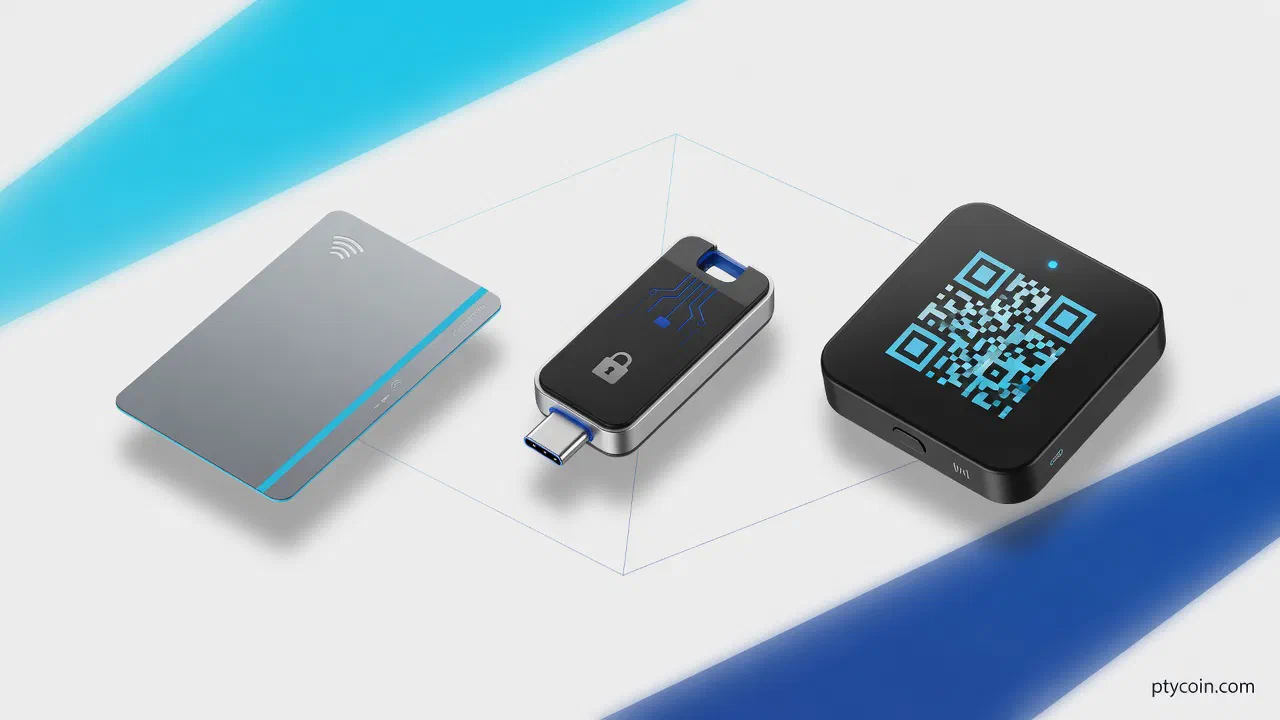
Card-style wallets (NFC tap)
Examples: Tangem cards and ring, and similar NFC-based designs.
These look like payment cards or wearables. You tap them against your phone’s NFC antenna to sign. There is no USB cable and no battery — the phone powers the chip for the few milliseconds signing takes.
Strengths:
- Portability. Fits in a wallet next to your ID. Popular in LatAm workshop settings because onboarding is literally “tap the card.”
- Durability. Tangem advertises IP69K water resistance and operation from −25 °C to 50 °C — relevant in tropical humidity and coastal salt air.
- Seedless backup option. A typical set ships with two or three cards that each hold the same key, so losing one card does not mean writing a 12-word phrase on paper (Tangem’s FAQ describes the trade-off: with only two cards, losing one and forgetting your access code can lock you out).
- Multi-chain breadth. Tangem lists support for thousands of tokens across dozens of networks in its app — useful if you hold stablecoins on multiple chains, not just Bitcoin.
Trade-offs:
- Phone dependency. Signing requires a smartphone with NFC and the vendor’s app. No phone, no spend — plan accordingly.
- Trust the app layer. You still read balances on the phone screen. Verify receive addresses carefully; malware can show a fake QR code even if signing is secure.
- Closed vs. open source mix. Tangem publishes app source on GitHub and uses a certified secure element, but the card firmware is not fully community-audited the way some Bitcoin-only devices are. Know your threat model.
Best for: Newcomers, mobile-first users, people who travel light, and families who want a backup card in a second location without managing seed phrases on paper.
USB-connected wallets (Ledger, Trezor, and peers)
Examples: Ledger Nano series and Stax, Trezor Safe line, BitBox02, Blockstream Jade.
These are the familiar thumb-drive-sized devices. You plug into a computer or phone (USB-C or Bluetooth on some models) and confirm transactions on a small built-in screen.
Strengths:
- Mature ecosystem. Broad wallet software support — Electrum, Sparrow, Ledger Live, Trezor Suite, and many mobile companions.
- On-device verification. You see the recipient address and amount on the hardware screen before pressing confirm — the baseline defense against address substitution.
- Range of price and skill. From ~$50 entry models to premium touchscreens. Trezor and Ledger both support passphrase-protected hidden wallets for plausible deniability.
- Bitcoin and altcoin flexibility. Most USB wallets handle many assets; some Bitcoin maximalists still prefer them for multisig and advanced script workflows.
Trade-offs:
- Cables, batteries, and wear. Bluetooth models need charging; USB ports collect dust; cables break. Keep a spare cable in your go bag.
- Supply-chain risk. Ledger’s 2023 firmware controversy reminded users to understand optional recovery services — stick to standard seed backup unless you explicitly want a cloud-assisted option.
- Heat and humidity. Electronics in a backpack through a tropical summer are fine day-to-day, but condensation when moving from cold AC to humid outdoors is real. Let devices acclimate; use a dry case.
Best for: Users who want desktop + mobile flexibility, multisig tinkerers, and anyone who prefers typing passphrases on a computer with a dedicated confirmation screen.
Air-gapped wallets (QR and microSD)
Examples: COLDCARD Mk5 and Q, some Jade modes, SeedSigner-style DIY builds.
Air-gapped means the signing device never talks to the internet or USB host directly. You move unsigned transactions in via QR code or microSD card; the device signs offline; you move the signed transaction back out the same way.
Strengths:
- Strong isolation. Even a compromised laptop cannot exfiltrate keys over USB if USB is disabled or unused. COLDCARD’s documentation emphasizes this design for Bitcoin self-custody.
- Bitcoin-native features. PSBT (Partially Signed Bitcoin Transaction) workflows, duress PINs, brick-me PINs, and seed encryption are common on this tier.
- Verifiable firmware. Many air-gapped Bitcoin devices support reproducible builds or signed firmware you check before upgrading.
Trade-offs:
- Friction. Every spend is a multi-step dance: build tx → transfer to device → sign → broadcast. Fine for savings you touch quarterly; tedious for daily coffee Lightning spends.
- Learning curve. Passphrases, PIN policies, and backup schemes (including Seed XOR on COLDCARD) reward study. Not ideal for a relative who will not read a manual.
- Narrower altcoin support. Most air-gapped tools are Bitcoin-first. Stablecoin-heavy portfolios usually need a second device or a different form factor.
Best for: Long-term Bitcoin holders, security-conscious users with a home computer, and anyone willing to trade convenience for isolation.
How to choose — a quick decision path
Figure: Match form factor to how you transact, then apply the backup and verification habits that fit your climate and family layout.
Comparison at a glance
| Factor | Card (NFC) | USB | Air-gapped |
|---|---|---|---|
| Portability | Excellent | Good | Moderate (extra parts) |
| Phone / PC need | Phone + NFC | Either | PC to build & broadcast |
| Typical backup | Duplicate cards or optional seed | 12/24-word seed | Seed + advanced schemes |
| Multi-chain | Strong | Strong | Mostly Bitcoin |
| Learning curve | Low | Medium | High |
| Climate / travel | Waterproof sets; no charger | Cable/charge care | Keep SD/QR sheets dry |
Backup UX — the detail that decides survival
The device is only half the product; the recovery story is the other half.
- Card wallets often ship multi-card sets so “backup” means a second physical card in a separate location — a sibling in another country, a safe deposit box, or a trusted relative. If you opt into a traditional seed phrase anyway, treat it like any other wallet: pen on paper, never photographed, stored away from the cards themselves.
- USB wallets almost always use a BIP-39 seed phrase. Write it once, legibly, and consider a metal punch card for humidity and flood zones common in coastal LatAm cities.
- Air-gapped devices frequently add encryption passwords, duress PINs, or split backups. Powerful, but your heirs need documentation they can follow without guessing.
Whatever you pick, run a recovery drill on a quiet afternoon: wipe the app profile or factory-reset the device, then restore from backup. If that process scares you, simplify before real money is involved.
Why this matters in Latin America
Regional adoption is not abstract — workshops from Venezuela to Argentina regularly demo card taps because they work without a laptop and survive a pocket commute. Remittance receivers often juggle stablecoins on multiple chains; a single NFC card that lists broad token support can beat juggling three different hot wallets.
At the same time, LatAm holders face distinct pressures:
- Humidity and flooding punish paper seeds stored in kitchen drawers. Metal backups and waterproof card sets address real weather, not theoretical risk.
- Travel and migration make pocket-sized custody tools valuable. A card or tiny USB device crosses borders more quietly than explaining a mining rig; split backups across countries match how families already diversify fiat cash.
- Intermittent connectivity favors devices that can sign offline once the transaction is prepared — air-gapped for vaults, cards for when mobile data returns.
- Non-technical relatives may need to access funds in an emergency. A three-card Tangem-style setup with clear written instructions can be easier than asking someone to type 24 words into Sparrow.
None of this is an endorsement of one vendor. It is a map of which shapes fit which lives.
The bottom line
There is no single “best” hardware wallet — only the best match for your chains, your technical patience, and where you will store backups.
- Choose cards if you live on your phone, want dead-simple signing, and like physical duplicate backups.
- Choose USB if you want the widest software compatibility and a proven on-device confirmation screen.
- Choose air-gapped if Bitcoin cold storage is the priority and you accept more steps per transaction.
Buy only from official channels. Test with a small amount. Document recovery for whoever might need it. And remember: the form factor is the shell — disciplined backup and address verification are what actually keep the coins yours.
Your keys, your coins, your responsibility.